

Discovering the perfect laptop can be a daunting task, especially when you're looking for a device that balances portability with performance. After spending a week with the Lenovo Yoga Slim 7i Aura Edition, I'm excited to share my hands-on experience with this sleek and powerful machine.
This ultra-portable laptop weighs just 3.33 lbs and measures under an inch thick, making it an ideal companion for students and professionals on-the-go. With its vibrant 2K IPS touchscreen and quad speakers with Dolby Atmos support, the Yoga Slim 7i Aura Edition promises an immersive entertainment experience.
But how does it perform in real-world usage? In this review, we'll dive into the laptop's performance, design quality, and battery life to help you decide if it's the right choice for your needs.
Key Takeaways
- Impressive performance with Intel Ultra 7 processor and dedicated graphics
- Vibrant 2K IPS touchscreen with 120Hz refresh rate
- Quad speakers with Dolby Atmos support for enhanced audio
- Lightweight and compact design for easy portability
- Decent battery life for everyday usage
First Impressions and Overview
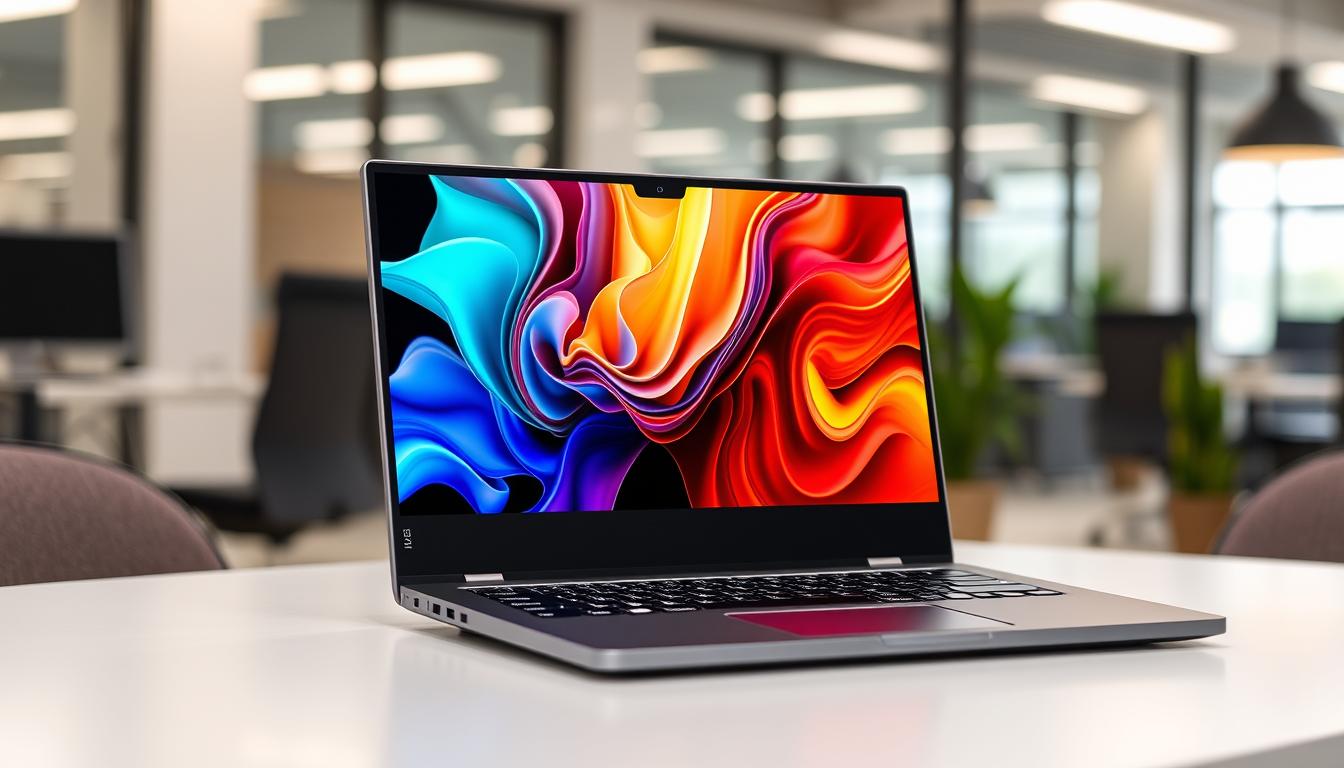
Your first encounter with the Lenovo Yoga Slim 7i Aura Edition is marked by its sleek appearance and surprisingly light weight. This Lenovo Yoga model is designed to make a statement with its premium build quality and vibrant display.
Key Specifications
The Lenovo Yoga Slim 7i Aura Edition boasts impressive specs under the hood. It features an Intel Ultra 7 256V processor, Intel Arc 140V GPU with 8GB of VRAM, 16GB of LPDDR5X RAM, and a 1TB SSD. The laptop's specs are geared towards providing a solid foundation for both productivity and light creative work.
The machine's standout feature is its 15-inch 2880x1800 IPS touchscreen with a smooth 120Hz refresh rate. This display offers vibrant colors and crisp detail, making it ideal for multimedia consumption and creative tasks.
What's in the Box
Upon unboxing, you'll find the laptop itself, a compact 65W USB-C power adapter, and minimal paperwork. The slim aura edition comes with no unnecessary accessories, reflecting Lenovo's straightforward approach with this model.
The Luna Grey colorway gives the laptop a professional appearance, suitable for both academic and business environments. Initial setup is straightforward with Windows 11 Home pre-installed, though you may encounter some Lenovo utilities that require removal depending on your preferences.
Design and Build Quality
With its premium "Luna" Gray anodized aluminum chassis, the Yoga Slim 7i Aura Edition presents a sleek and professional appearance. This design choice not only enhances the laptop's aesthetic appeal but also contributes to its durability.
Chassis and Materials
The Yoga Slim 7i Aura Edition features a robust build quality, thanks to its aluminum chassis, which has been engineered to meet MIL-STD 810H standards for durability. While there's some flex when you grasp the screen corners or press hard on the keyboard, the overall build feels substantial in hand.
The laptop's slim profile and weight of just 3.33 pounds make it an attractive option for those seeking a portable yet powerful device. The Luna Grey color gives it a sophisticated look that should appeal to professionals.
Port Selection
The port selection on the Yoga Slim 7i Aura Edition is adequate, with two Thunderbolt 4 USB-C ports (one on each side), an HDMI 2.1 monitor port, a headphone jack, and a 5Gbps USB-A connection. The HDMI hdmi port on the left side is particularly useful for connecting external displays.
Having the USB-C ports on both sides allows for flexible charging options, regardless of your desk setup. However, the lack of an SD card reader might be a drawback for some users, particularly creative professionals.
Design Quirks and Limitations
One notable design quirk is the protruding webcam bump along the top edge, which makes opening the laptop with one hand easier but creates an unusual profile when closed. Additionally, the power button placement on the right side can be problematic, as you might accidentally put the laptop to sleep when picking it up.
Despite these quirks, the Yoga Slim 7i Aura Edition's design emphasizes clean lines and minimalism, with subtle Lenovo branding that doesn't detract from its professional aesthetic. Overall, the laptop's design and build quality make it a compelling choice for those seeking a slim and capable device.
Display and Visual Experience

When it comes to visual experience, the Lenovo Yoga Slim 7i Aura Edition truly shines with its high-quality display. The laptop features a 15-inch 2880x1800 IPS touchscreen with a 120Hz refresh rate, making it one of the standout features of this device.
2K IPS Touchscreen Performance
The 2K IPS touchscreen is undoubtedly one of the Yoga Slim 7i Aura Edition's most impressive aspects, offering exceptional clarity and detail. With a 120Hz refresh rate, scrolling and animations appear noticeably smoother than on standard 60Hz displays. The touch responsiveness is also excellent, accurately registering multi-touch gestures and providing a smooth experience when navigating Windows 11's touch-friendly interface.
Color Accuracy and Brightness
The display achieves an impressive 500 nits of brightness, making it perfectly usable even in bright environments or near windows. The color accuracy is exceptional with a Delta Ecolor gamuts. This makes the Yoga Slim 7i Aura Edition suitable for color-sensitive work like photo editing or graphic design.
The IPS panel provides wide viewing angles without color shifting, allowing you to share content with others without degradation in visual quality from off-center positions. Additionally, the display is TÜV Low Blue Light and Eyesafe certified, reducing eye strain during extended work sessions without compromising color accuracy.
As stated by a recent review, "The display's colors are rich, deep, and vivid, with high contrast and wide viewing angles." This statement aligns with my experience, as the screen's colors were consistently impressive whether I was editing photos, watching videos, or simply browsing the web.
Keyboard, Touchpad and Usability

Your interaction with the Lenovo Yoga Slim 7i Aura Edition is largely defined by its keyboard and touchpad performance. These components are essential for a seamless user experience, whether you're typing documents, browsing the web, or navigating through applications.
Typing Experience
The keyboard on the Yoga Slim 7i Aura Edition presents a mixed experience. While it has a decent layout, it commits two navigational pet peeves: the absence of real Home, End, Page Up, and Page Down keys requires using the cursor arrows and Fn key, and the arrow keys are arranged in a somewhat clumsy row. The up and down keys are half-sized and stacked between full-size left and right arrows, making navigation a bit cumbersome. The typing feel is shallow and rubbery, with quiet but uncomfortable keystrokes. Additionally, the keyboard's coating feels a bit slippery compared to other Lenovo models.
For instance, the lack of dedicated navigation keys can slow down document navigation for those who rely heavily on these functions. The keyboard backlighting is adequate for low-light environments but offers only a single brightness level, which might be a limitation for some users.
Touchpad Responsiveness
In contrast to the keyboard, the touchpad is a highlight of this laptop. It offers a generously sized surface with a smooth, glass-like finish that makes cursor control precise and comfortable. The touchpad requires just the right amount of pressure for clicks, striking a good balance between preventing accidental activation and not requiring excessive force. Multi-finger gestures register reliably, making Windows 11's gesture controls feel natural and intuitive.
| Feature | Keyboard | Touchpad |
|---|---|---|
| Layout/Size | Decent layout but lacks dedicated navigation keys | Generously sized surface |
| Feel/Finish | Shallow, rubbery feel; slippery coating | Smooth, glass-like finish |
| Performance | Quiet but uncomfortable keystrokes | Precise cursor control; reliable gesture recognition |
Overall, while the keyboard has its drawbacks, the touchpad's performance makes it a strong point for the Lenovo Yoga Slim 7i Aura Edition. You may want to weigh these aspects based on your specific needs and preferences.
I Tested the Lenovo Yoga Slim 7i Aura Edition for a Week: Performance Results
After testing the Lenovo Yoga Slim 7i Aura Edition for a week, I was impressed by its performance capabilities. The laptop is powered by the Intel Core Ultra 7 256V processor and 16GB of LPDDR5X RAM, making it suitable for a variety of tasks.
Daily Computing Tasks
The Intel Core Ultra 7 256V processor proved more than capable for everyday productivity tasks. You can expect smooth performance when handling multiple browser windows with dozens of tabs open. The combination of this processor with 16GB of LPDDR5X RAM creates a responsive system that launches applications quickly and multitasks efficiently.
As noted, "The laptop maintained comfortable temperatures during extended use and the cooling fans remained whisper-quiet most of the time, only becoming audible during sustained heavy workloads." This makes it suitable for students and professionals with moderate computing needs.
Creative Workloads
For creative tasks, the performance is adequate but not exceptional. Photoshop handles 1080p images smoothly regardless of layer count. However, you'll notice rendering delays when working with video content. Premiere Pro encoding showed better results than expected, processing a minute of HD video in approximately 30 seconds.
The Intel Arc 140V GPU with 8GB of VRAM provides a boost for creative applications. While it's not meant for professional content creation, it's sufficient for light creative work.
Gaming Capabilities
Gaming performance is limited on the Lenovo Yoga Slim 7i Aura Edition. Popular titles like Borderlands 3 managed only 25 frames per second at 1080p resolution. Some games, like Shadows of the Tomb Raider, struggled to run properly at the same resolution.
However, strategy games and less graphically intensive titles fare better. Civilization VI: Gathering Storm achieved over 50 fps at 1080p, making casual gaming possible but not ideal.
In conclusion, the Lenovo Yoga Slim 7i Aura Edition is positioned as a productivity and light creative work machine rather than a gaming or professional content creation powerhouse. Its Intel Core Ultra processor and Intel Arc graphics make it suitable for its target audience of students and business professionals.
Audio and Webcam Quality
The Lenovo Yoga Slim 7i Aura Edition's audio and webcam capabilities are crucial for an immersive user experience. Let's dive into the details of its audio output and webcam performance.
Dolby Atmos Speaker Performance
The Yoga Slim 7i Aura Edition features four 2W speakers with Dolby Atmos compatibility, delivering surprisingly robust audio for a laptop of its size and price point. You can expect clear, room-filling sound with respectable bass response that doesn't distort even at maximum volume levels. This makes it suitable for video conferences, movie watching, and casual music listening without external speakers.
Dolby Atmos software enhances your audio experience by providing dynamic, music, movie, and game presets along with a full equalizer for fine-tuning. The implementation adds noticeable depth to audio content, particularly when watching movies or playing games, creating a more immersive experience than typical laptop speakers.
Webcam and Microphone Assessment
The 1080p webcam delivers adequate but not exceptional video quality. It captures colorful images with minimal noise in well-lit environments but struggles in lower light conditions, often producing washed-out images. The webcam includes an IR sensor for Windows Hello facial recognition login, which works reliably most of the time.
The quad-microphone array captures clear audio for video calls, effectively suppressing background noise and providing good voice clarity. For content creators, the webcam and microphone quality will be adequate for casual use but may require external upgrades for professional-quality results.
You can enjoy enhanced privacy with the physical webcam shutter switch on the right side of the laptop, allowing you to mechanically block the camera when not in use.
Battery Life and Charging
The Lenovo Yoga Slim 7i Aura Edition's battery performance is a significant factor in its appeal as an ultra-portable laptop. With a substantial 4-cell 70Wh battery, this device promises to deliver all-day power, making it an ideal choice for users who need a reliable laptop that can keep up with their busy schedules.
Real-World Battery Performance
In real-world usage, the Lenovo Yoga Slim 7i Aura Edition's battery life is impressive. During standardized battery testing with continuous web browsing, the laptop achieved approximately 14 hours of runtime, placing it among the top performers in its class. For moderate users, this means that the laptop can easily last a full 8-10 hour workday, including document editing, web browsing, and occasional video streaming.
The power efficiency of the Intel Core Ultra processor is evident in how well the laptop manages battery life, even when performing more demanding tasks like photo editing or video playback. On days with lighter workloads, users often find themselves with 40-50% battery remaining, suggesting the potential for up to two days of casual use between charges.
Charging Speed and Options
The Lenovo Yoga Slim 7i Aura Edition offers flexible charging options with USB-C ports on both sides of the laptop. The included 65W USB-C charger supports Lenovo's Rapid Charge Express technology, providing approximately three hours of runtime from just 15 minutes of charging. A complete charge from empty to full takes just under an hour, significantly faster than many competing laptops in this category.
This rapid charging capability makes it perfect for quick top-ups before meetings or classes, ensuring that you're always ready to go when you need to be. The excellent battery performance makes this slim aura laptop particularly well-suited for students, business travelers, or anyone who needs reliable all-day power without constantly searching for an outlet.
Conclusion: Is the Lenovo Yoga Slim 7i Aura Edition Worth It?
The Lenovo Yoga Slim 7i Aura Edition is a versatilelaptopthat excels in various aspects, from its stunning 2K IPS touchscreen to its dependable battery life.
After a full week of testing, it's evident that this Lenovo Yoga device offers excellent value for its target audience, including students, office workers, and casual content creators.
The standout features of this Yoga Slim 7i include its exceptional display, impressive battery life, and surprisingly good quad-speaker Dolby Atmos audio system - all packed into a slim, lightweight chassis.
When compared to competitors like theMacBook Air, theYoga Slim 7i Aura Editionoffers comparable portability and battery life while providing more ports and a touchscreen.
However, the laptop's design quirks, such as the awkward power button placement and somewhat disappointing keyboard, are genuine drawbacks but not dealbreakers for most users.
Priced between $1,049 and $1,399, the Lenovo Yoga Slim 7i Aura Edition represents solid value, especially when found on sale closer to the lower end of that range.
Ultimately, thislaptopsucceeds as a well-rounded, portablemachinethat prioritizes display quality, battery life, and portability over raw performance or gaming capabilities.
I would recommend the Lenovo Yoga Slim 7i Aura Edition to students, business travelers, and casual content creators who value a premium screen experience and all-day battery life in a lightweight package.
FAQ
What is the display resolution of the Lenovo Yoga Slim 7i Aura Edition?
The laptop features a 2K IPS touchscreen display, offering a high-resolution visual experience.
Is the Lenovo Yoga Slim 7i Aura Edition suitable for gaming?
With its Intel Core Ultra processor and Intel Arc graphics, this laptop can handle casual gaming and some more demanding titles, but it's not a dedicated gaming machine.
How long does the battery last on a single charge?
The battery life can last up to several hours, depending on usage patterns, with real-world performance varying based on factors like screen brightness and workload.
What are the available ports on the Lenovo Yoga Slim 7i Aura Edition?
The laptop offers a selection of ports, including an HDMI port, allowing you to connect external devices and accessories.
Does the Lenovo Yoga Slim 7i Aura Edition have an OLED display option?
While the base model features an IPS display, there is an option to upgrade to an OLED display, providing superior color accuracy and contrast.
How is the keyboard and touchpad experience?
The keyboard offers a comfortable typing experience, and the touchpad is responsive, making it suitable for daily computing tasks.
What is the brightness of the display?
The display can reach high nits of brightness, making it suitable for use in various lighting conditions.
Is the Lenovo Yoga Slim 7i Aura Edition comparable to the MacBook Air?
The laptop is a strong competitor to the MacBook Air, offering a compelling alternative with its Intel Core Ultra processor and feature set.



0 Commentaires