

You're considering a new laptop, and the latest MacBook Air 15-inch with the M4 chip has caught your attention. A year after the M3 model, this new version brings significant improvements to a proven formula. With a silent design and excellent performance, it's a compelling choice.
The new model starts at $1,199 / £1,299 / AU$2,099, surprisingly cheaper than its predecessor. But is it worth the investment? Let's dive into what leading tech publications are saying about this laptop.
Discover the consensus among tech reviewers and whether this MacBook model offers good value in today's competitive market.
Key Takeaways
- Leading tech publications' reviews on the latest MacBook Air 15-inch with M4 chip.
- Key improvements over the previous model, including performance and design.
- Price comparison and value for money assessment.
- Target audience for the MacBook Air 15-inch (M4).
- Upgrade considerations for current MacBook Air owners.
What's New in the MacBook Air 15-inch (M4)?
The new MacBook Air 15-inch (M4) has arrived, packing significant upgrades and a surprising price drop. This latest model from Apple continues to solidify its position as a leader in the laptop market.
Key Specifications
The MacBook Air 15-inch (M4) boasts impressive specs, including the powerful M4 chip, which significantly enhances performance. The base model comes with 16GB of RAM, a notable upgrade that improves multitasking capabilities. With storage options starting from 512GB SSD, users can expect fast and efficient data access.
Design Updates and Sky Blue Color
Apple has refreshed the design of the MacBook Air 15-inch (M4) with a new Sky Blue color option, adding a touch of vibrancy to the lineup. The overall design remains sleek and portable, making it perfect for on-the-go users.
Price Reduction from Previous Generation
Pricing on the M4 MacBook Air starts at $999 for the 13-inch version, and $1,199 for the 15-inch model. Notably, the 15-inch MacBook Air (M4) is priced lower than its M3 predecessor, making it an attractive option for those seeking value without compromising on performance.
The price reduction, combined with the upgraded specs, positions the MacBook Air 15-inch (M4) as a compelling choice in the laptop market. By offering more value at a lower price, Apple is making its premium technology more accessible to a wider audience.
TechRadar's Verdict: "An Excellent Thin and Light Laptop"

TechRadar's verdict on the MacBook Air 15-inch (M4) is that it's an excellent thin and light laptop, but with some caveats. The review highlights both the strengths and weaknesses of this new model.
The Good: Performance, Price, and Silent Design
The MacBook Air 15-inch (M4) excels in several areas. Its performance is significantly improved with the M4 chip, making it suitable for demanding tasks. Additionally, the laptop's price is competitive, offering good value for the money. Another notable feature is its silent design, which ensures a distraction-free user experience.
You'll appreciate the refinement in performance, which, while not revolutionary, is certainly welcome. The M4 chip brings a boost in efficiency and speed, making it a solid choice for those looking for a reliable laptop.
The Bad: Incremental Upgrade, No Wi-Fi 7
However, the review also points out some drawbacks. The upgrade from previous models is more incremental than transformative. If you already own an M2 or M3 MacBook Air, the performance improvement may not justify an upgrade to the M4 version.
Another missed opportunity is the lack of Wi-Fi 7 support, a feature that is becoming increasingly common in premium laptops. This omission might be a consideration for those who value having the latest connectivity standards.
The Verge's Take: "Nailing the Fundamentals at a Fair Price"
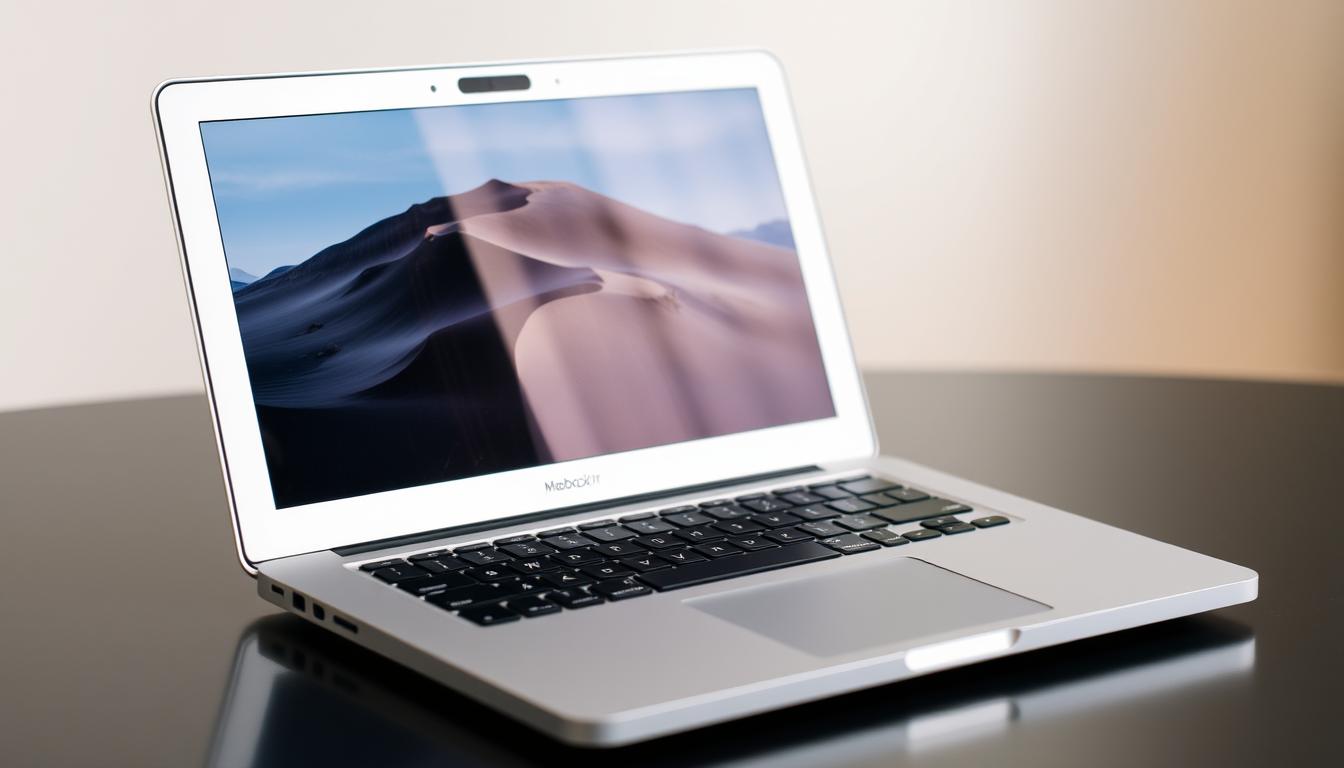
According to The Verge, the MacBook Air 15-inch (M4) successfully balances performance and price. This review highlights both the strengths and weaknesses of the device.
Praised: Battery Life and Design
The Verge praises the MacBook Air 15-inch (M4) for its impressive battery life and sleek design. The laptop's ability to last throughout the day without needing a recharge is a significant advantage for users who are always on the go.
The design of the MacBook Air is also commended for its aesthetic appeal and portability. The addition of the Sky Blue color option is seen as a refreshing update.
Criticized: Limited Storage and Ports
However, The Verge criticizes the base-level MacBook Air 15-inch (M4) for its limited storage, starting at 256GB. The review notes that this capacity may be insufficient for many users' needs, particularly those who store large files or multiple applications.
Furthermore, the review points out that upgrading to a 512GB SSD comes at a significant cost, with Apple charging $200 for the upgrade. The limited number of ports, with only two Thunderbolt 4 ports available alongside a MagSafe charging port and a 3.5mm headphone jack, is also seen as a drawback.
The increase to 16GB of RAM in the base model is appreciated, but the overall configuration is considered a mixed bag.
CNET's Assessment: "The Goldilocks Zone of Apple's Lineup"

According to CNET, the MacBook Air 15-inch (M4) strikes a perfect balance in Apple's product lineup. This assessment is based on the laptop's overall performance, design, and features.
Highlights: Screen Size and Efficient Performance
The MacBook Air 15-inch (M4) is praised for its efficient performance and larger screen size. CNET notes that the laptop's display is a significant upgrade, offering more screen real estate for users. The M4 chip provides a boost in performance, making it suitable for demanding tasks.
Drawbacks: Expensive Storage Upgrades
One of the major drawbacks highlighted by CNET is the expensive storage upgrade options. The base model comes with a 256GB SSD, but upgrading to a 512GB SSD costs an additional $200. CNET criticizes this pricing strategy, suggesting that it may be expensive for many users. The full range of storage upgrade options is available, from 256GB to 2TB, with associated costs being $200 for 512GB, $400 for 1TB, and $800 for 2TB.
You should consider your storage needs carefully, as the base configurations may not be sufficient for everyone, especially those who work with large files or multiple applications. The cost of upgrading to a higher SSD capacity, such as 512GB or more, can significantly add to the overall cost.
Wired's Opinion: "Finally Come Into Its Own"

The MacBook Air 15-inch (M4) has finally come into its own, according to Wired's latest review. This assessment highlights the laptop's significant upgrades and improvements over its predecessors.
Strengths: Lower Price and Sharper Webcam
The MacBook Air 15-inch (M4) boasts several strengths, including a lower price point compared to its predecessor, making it more competitive in the market. Additionally, the laptop features a sharper webcam, enhancing the overall user experience, particularly for those who use their MacBook for video conferencing and content creation.
Wired appreciates the improved external display support, allowing users to connect to two 6K displays simultaneously. This is a significant upgrade from the previous model, which only supported one external display at 6K resolution.
Weaknesses: One-sided Port Layout
Despite its many strengths, Wired notes that the MacBook Air 15-inch (M4) has a one-sided port layout, with all connections, including two Thunderbolt 4 USB-C ports, a MagSafe port, and a 3.5mm headphone jack, located exclusively on the left side. This design choice can lead to cable management challenges for some users.
The review highlights that while the port selection is robust, the one-sided layout may not be ideal for everyone, particularly those with specific desk setups.
Engadget's Review: "The Ideal Ultraportable for Most Users"

According to Engadget, the MacBook Air 15-inch (M4) stands out as a superior ultraportable laptop. Engadget's review highlights both the strengths and weaknesses of this new device.
Pros: Performance and Battery Life
The MacBook Air 15-inch (M4) excels in performance and battery life, making it an excellent choice for users seeking a reliable and efficient laptop. With its powerful M4 chip, you can expect seamless multitasking and swift application launches. The battery life is also commendable, allowing you to work or enjoy entertainment without frequent recharging.
The 15.3-inch Liquid Retina Display offers a resolution of 2880 x 1864 at 224 pixels per inch, providing vivid and true-to-life colors. The display supports 1 billion colors and P3 Wide color, making it ideal for creative professionals and those who value high-quality visuals.
Cons: Limited Ports and Screen Refresh Rate
Despite its many strengths, Engadget notes that the MacBook Air 15-inch (M4) has some limitations. The port selection is restricted to two Thunderbolt 4 USB-C ports, a MagSafe port for charging, and a 3.5mm headphone jack. This may necessitate the use of dongles or hubs for users with multiple peripherals.
Another drawback is the standard 60Hz screen refresh rate, which feels dated compared to competing laptops that offer 90Hz or 120Hz refresh rate for smoother scrolling and animations. While the display quality is excellent in terms of color accuracy and brightness, the refresh rate is a limitation to consider.
Apple MacBook Air 15-inch (M4) Review Roundup – Should You Buy Apple's New Light Laptop?
When considering the purchase of the MacBook Air 15-inch (M4), it's essential to weigh the benefits against the costs. The new MacBook Air model has been reviewed by several tech publications, providing insights into its performance, design, and value.
Performance Improvements Over Previous Models
The M4 chip in the MacBook Air 15-inch brings significant performance improvements over its predecessors. Reviewers have noted that while the M4 offers better performance, the upgrade may not be substantial enough for those already using the M3 MacBook Air or M2 MacBook Air. The performance boost is more noticeable for users coming from Intel-based Macs or older M1 models.
Who Should Upgrade vs. Who Should Wait
If you're currently using an M2 or M3 MacBook Air, it might be worth waiting for a future generation, as the performance improvements don't justify the cost of upgrading to the M4 model. However, users of Intel-based Macs or M1 MacBook Air models will see significant benefits from upgrading to the M4 version. The 15-inch model is particularly suited for those who value screen space and audio quality.
- Users of Intel-based Macs or M1 MacBook Air will benefit from upgrading to the M4 model.
- Those with M2 or M3 MacBook Air models should consider waiting for future upgrades.
- The 15-inch MacBook Air is ideal for users who need a larger display and better sound.
MacBook Air 15-inch vs. 13-inch: Which Size Should You Choose?

The MacBook Air 13-inch and 15-inch models offer distinct differences that can impact your user experience. When considering which size to choose, it's essential to examine the variations in screen size, weight, speaker quality, and performance.
Screen Size and Weight Differences
The MacBook Air 15-inch model boasts a larger display compared to the 13-inch version, making it ideal for those who need more screen real estate for multitasking or entertainment. However, this increase in size also results in a slightly heavier device. The 15-inch MacBook Air weighs approximately 3.3 pounds, while the 13-inch model is about 2.7 pounds. Despite the difference, both models maintain their signature slim and lightweight design, making them highly portable.
Speaker Quality and Performance Variations
A significant difference between the two models lies in their speaker systems. The 15-inch MacBook Air features a six-speaker system with force-cancelling woofers, providing a richer and more immersive sound experience. In contrast, the 13-inch model has a four-speaker setup. Both support spatial audio and wide stereo sound, but the larger model's implementation is more impressive, offering deeper bass without device vibration. Performance-wise, the base 15-inch model comes with a 10-core CPU, whereas the entry-level 13-inch model has an 8-core CPU, giving the 15-inch a slight edge in processing power.
Is the MacBook Air 15-inch (M4) Worth the Price?

To determine if the MacBook Air 15-inch (M4) is worth the investment, it's essential to evaluate its cost against the backdrop of available Windows alternatives.
Value Compared to Windows Alternatives
When comparing the MacBook Air 15-inch (M4) to Windows laptops, several factors come into play. Windows alternatives like the Dell XPS 15 or HP Envy x360 offer competitive performance and features. However, the MacBook Air's seamless integration with other Apple devices and its robust security features give it a unique edge. The base model, starting at a competitive price, makes it an attractive option for those invested in the Apple ecosystem. For users deeply integrated with Apple's services, the MacBook Air 15-inch (M4) offers a cohesive and streamlined experience that Windows alternatives struggle to match.
Cost of Upgrades and Configurations
The cost of upgrading the MacBook Air 15-inch (M4) can significantly impact its overall value. Upgrading from 16GB to 24GB of unified memory costs $200, while jumping to 32GB costs $400. Storage upgrades are also pricey, with a $200 charge to double the SSD from 256GB to 512GB. Reviewers have criticized these costs as excessive. For instance, upgrading to 1TB SSD costs $400, and going to 2TB SSD costs $800. You should carefully consider your needs for memory and storage to determine if these upgrades are justified.
- Unified Memory Upgrades: +$200 for 24GB, +$400 for 32GB
- SSD Upgrades: +$200 for 512GB, +$400 for 1TB, +$800 for 2TB
Conclusion: The Verdict on the MacBook Air 15-inch (M4)
Reviewers have converged on a positive verdict for the MacBook Air 15-inch (M4), highlighting its value and user experience. The consensus among reviews is that Apple's new 15-inch laptop strikes an excellent balance between price, performance, and screen size.
The MacBook Air 15-inch (M4) is praised for its lower price compared to the previous model, making it a more attractive option for those seeking a premium laptop experience. Additionally, reviewers have commended its excellent build quality, including an outstanding trackpad and keyboard, as well as enhanced speakers. The M4 chip delivers improved performance, although the upgrade may not be significant enough to warrant a switch for those already using the M3 model.
However, some drawbacks are noted, such as limited base storage capacity and expensive upgrade options, as well as a restricted port selection. Despite these limitations, the 15-inch MacBook Air is considered one of the best laptops available, particularly for those upgrading from Intel-based Macs or older models.
If you're in the market for a premium 15-inch laptop and value a superior everyday user experience, the MacBook Air 15-inch (M4) is definitely worth considering. Its combination of performance, design, and price makes it an excellent choice for most users.
FAQ
What is the starting price of the MacBook Air 15-inch (M4) model?
The MacBook Air 15-inch (M4) starts at $999.
How does the battery life of the MacBook Air 15-inch (M4) compare to previous models?
The battery life is reported to be efficient, with some reviews praising its performance, but specific comparisons to previous models vary.
What are the storage options available for the MacBook Air 15-inch (M4), and are they upgradable?
The storage options start with a base SSD, and upgrades are available but are considered expensive by some reviewers.
How does the 15-inch MacBook Air's performance compare to the 13-inch model?
Performance variations between the 15-inch and 13-inch models are minimal, with the larger model offering a bigger screen and slightly different speaker quality.
What are the key design updates in the MacBook Air 15-inch (M4), and is it available in different colors?
The design updates include a new sky blue color option, and the laptop is praised for its silent and sleek design.
Are there any criticisms regarding the ports available on the MacBook Air 15-inch (M4)?
Yes, some reviewers criticize the limited number of ports and the one-sided port layout.
How does the MacBook Air 15-inch (M4) compare in terms of value to Windows alternatives?
The value comparison to Windows alternatives is subjective, but the MacBook Air is considered to be in the "Goldilocks zone" of Apple's lineup, offering a balance of performance and price.
What is the significance of the Center Stage feature on the MacBook Air 15-inch (M4)?
The Center Stage feature, along with Desk View, enhances the webcam experience, making it a notable upgrade.
Is the MacBook Air 15-inch (M4) suitable for users who require high GPU performance?
The GPU performance is considered efficient, but whether it's suitable depends on the specific needs of the user, particularly for demanding tasks.



0 Commentaires